
Release Notes April 2026
On April 22, 2026, your Tebra account will be upgraded to the latest version. Features will be available the following day with the exception of specified timelines.
Billing |
Billing General Improvements
- Providers that submit Medicare eligibility transactions through Tebra are now required to complete HIPAA Eligibility Transaction System (HETS) provider attestation as mandated by the Centers for Medicare and Medicaid Services (CMS). Provider attestation must be completed by May 11, 2026 to prevent disruptions to Medicare eligibility checks and ensure continued HETS access. Review the HIPAA Eligibility Transaction System (HETS) Provider Attestation FAQs and/or visit the CMS website to learn more about the HETS and how to attest/enroll.
Billing Resolved Issues
- Fixed an issue where the Insurance Collections report was displaying the incorrect claim statuses
- Fixed an issue where patient balance reminder emails were still sent when automated patient statement features were disabled
- Fixed an issue where patients experienced an HTTP Status 405 error when clicking the link to pay their balance on email and text balance reminders
- Fixed an issue where some users could not upload billing documents for practices formerly managed by Kareo Managed Billing (KMB)
Clinical
Clinical Resolved Issues
- Fixed an issue where patient medications are incorrectly listed when printing a Facesheet or a referral
- Fixed an issue where the patient immunizations were not sent to IronBridge
- Fixed an issue where users received an error message when attempting to prescribe a medication with a supervising provider
- Fixed an issue where users were unable to create a new lab order when using the previous lab experience
Engage
Engage Resolved Issues
- Fixed an issue where Patient Intake forms were being sent from the provider instead of the practice
Platform
Enhancement: Updated Navigation
Tebra has redesigned the mobile experience to provide a cleaner, more intuitive workflow. By replacing the cluttered header with a unified navigation panel, you can now access all top-level modules like Platform, Clinical, Billing, and Analytics from a single, structured menu.
Additionally, Recent Patients is integrated into the search bar, creating a centralized entry point that eliminates the need to toggle between separate icons. These changes reduce visual noise and simplify your journey, ensuring that switching modules and accessing patient records is faster and more efficient regardless of the screen size.
| Web Navigation
Example user view when accessing app.kareo.com on a full size (e.g., 1280 x 960) screen on a computer. |
 |
| Mobile Device and Responsive Navigation
Example user view when accessing app.kareo.com on a mobile device or a smaller screen on a computer. |
 |
Platform Resolved Issues
- Fixed an issue where the printed Daily Scheduled was incorrectly formatted
- Fixed an issue where the Facesheet did not correctly display upper case letters in the patient’s last name
Practice Growth
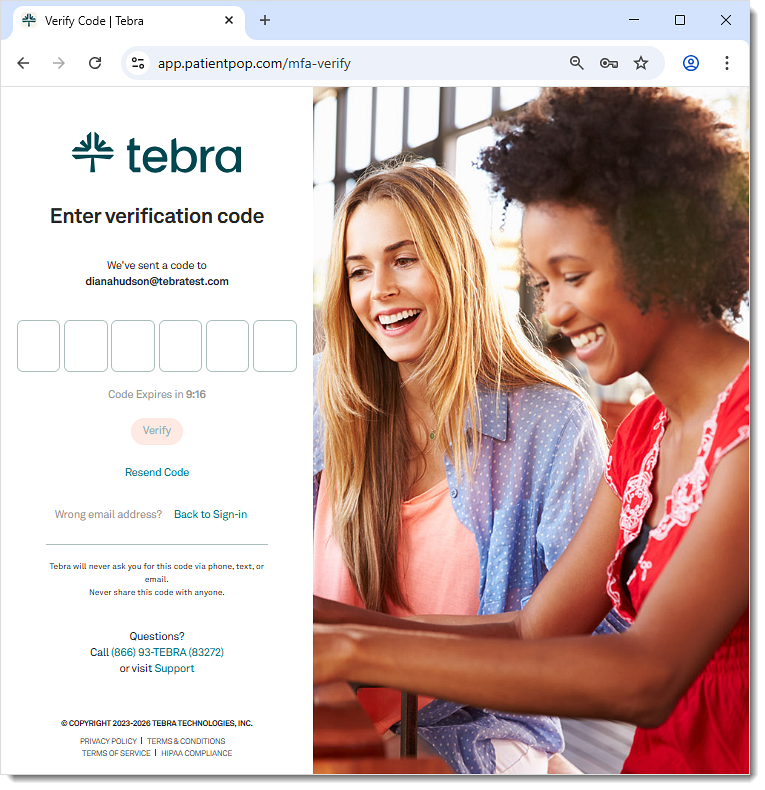
Two-Factor Authentication
Tebra’s Two-Factor Authentication strengthens account security by verifying logins with a secure six-digit code sent directly to the user’s email. This added layer of protection helps prevent unauthorized access, protects patient communications, and safeguards a practice’s reputation without adding meaningful friction to daily workflows.
In anticipation of the release, System Administrators should review all team member’s email address as soon as possible to avoid sign in issues when this change goes live. Each team member must have a valid unique up-to-date email address to which they can only access to receive a confirmation code.
Review the Two-Factor Authentication FAQs to learn more.
Feature will be deployed to customers in phases starting April 29, 2026 and completed by end of June 2026.
Practice Growth Login
|
 |
Practice Growth Resolved Issues
- Fixed an issue where the dashboard and monthly performance emails incorrectly reported the website visitor count as 0
- Fixed an issue where the share to Facebook icon is missing from the practice’s blog
- Fixed an issue where patients were unable to check into their Telehealth visit after completing the reCAPTCHA
Mobile App
Mobile App Resolved Issues
- Fixed an issue where the mobile app on iOS 26 unexpectedly closed when attempting to access a patient chart
- Fixed an issue where patients upcoming appointments were missing from the Patient Demographics, Agenda, and Calendar views
- Fixed an issue where changing the status of an appointment part of a recurring appointment series changed the status for all appointments in the series
- Fixed an issue where the calendar jumped to random dates when loading or changing provider/staff/room filters
- Fixed an issue where users received an error message when attempting to filter notes
- Fixed an issue where the notes filter did not display all providers
- Fixed an issue where the notes summary preview did not display on the patient’s notes tab
- Fixed an issue where the appointment time of the clinical not from the mobile app does not match the appointment time in the web platform
- Fixed an issue where the patient’s date of birth incorrectly displayed in an appointment
- Fixed an issue where the patient’s hospitalization and procedure dates incorrectly displayed one day early